panduan.lumbung.space
What is this?
Documentation for lumbung.space. It is mostly for members but you can also share documents publicly. You can edit documents together at the same time.
How do I log in?
Visit panduan.lumbung.space and click “Continue with login.lumbung.space”.
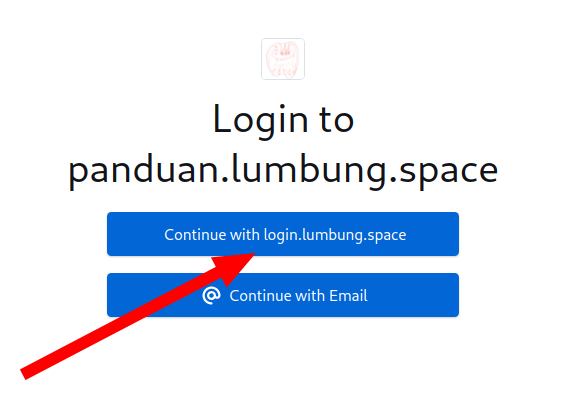
Click "Continue with login.lumbung.space"
How do I share a document publicly?
Look at the top-right part of the page, there is a “Share” button:

Click "Share"
You probably want to share publicy the document and nested documents:
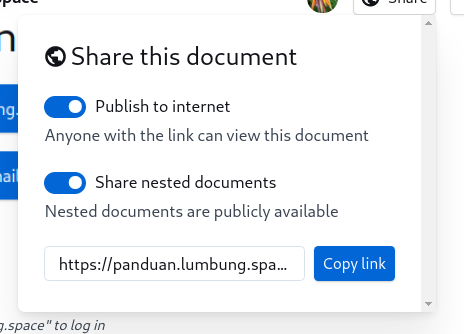
"Publish to internet" + "Share nested documents" makes everything public for this collection
Trouble logging in?
If you see the following error “Authentication failed“ it could be that you need to add your first name and last name to your account details in login.lumbung.space. This is unfortunate, but some softwares require more account details to function ? Please message in Autonomic Hotline on nongkrong.lumbung.space for support on how to make the necessary changes.
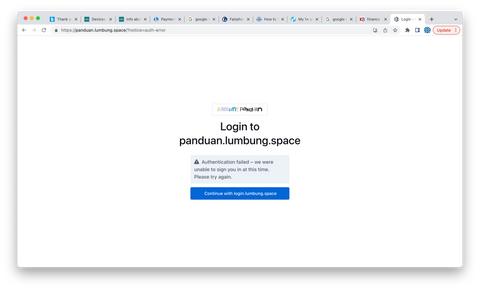
Troubleshooting
PROBLEM
Not Found error on MOBILE devices when Panduan document link shared (see below image).
SOLUTION:
Click homepage link
Continue to login with lumbung.space credentials